01
Approach
The idea behind this assignment is that the Arduino will monitor the temperature in a room and should it get above a specific temperature it will make an sound warning and set the LED on untill the temperature drops below the set temperature.
02
About the project
The alarm gets triggered whenever the temperature rises above 27 degrees celsius. And
shows a LED indication after a beep sound. I couldn't add the other input output Devices
because they were either not working or I left them at my hostel room.
I used a DHT11
temperature sensor, a LED, Arduino Uno, A buzzer and a resistor for this assignment.
Here's a video recorded showing the working of the System:
01
Setting Up
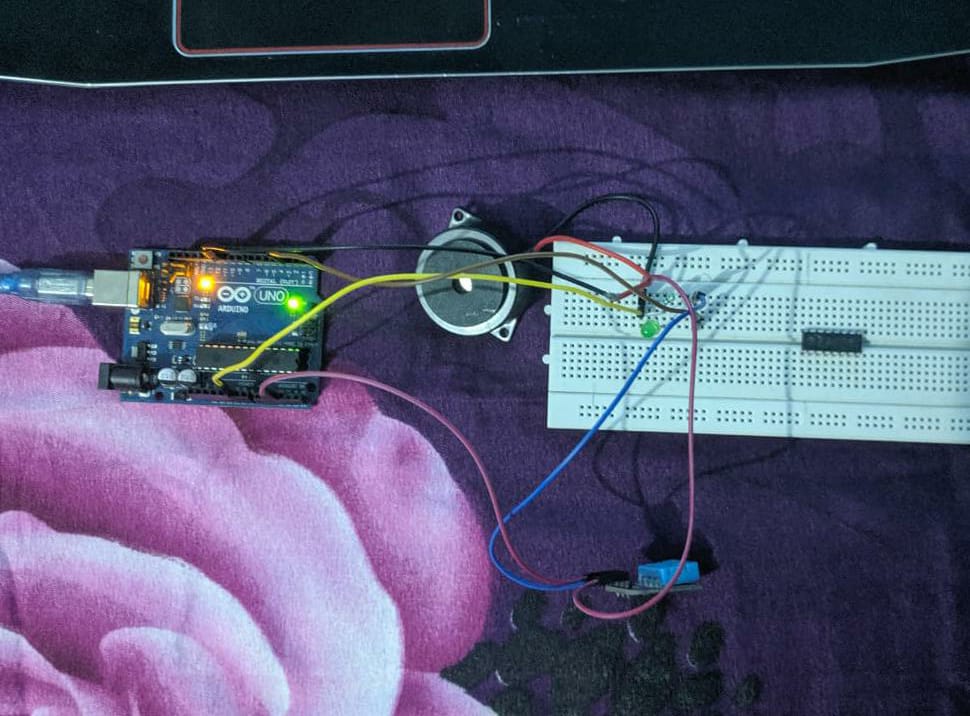
1. First of all, I made a common node for ground in the breadboard, and connected the
grounds of led, buzzer and the sensor to it.
2. Then for LED, I extended a resistor and connected it to digital pin 3.
3. Similarly for buzzer, I connected it to digital pin 5.
4. For DHT11 temperature sensor, I connected the positive terminal to 5V on the Arduino and
the output terminal to digital pin 2. The setup is now complete.
Here's an image of the final setup:
03
The Solution
I added a function which listens to the temperature values and two separate functions for LEDs
and Buzzer on and off. Whenever the value of the temp function goes above 27 degrees Celsius i.e after running the blower
the off functions for LED and buzzer were called and Similarly when the temperature went below 27 degress
the on functions were called. This was achieved through an if else statement.
04
05
Part A - Science Journal
Science Journal is an application by google which enables you to explore the functionalities
of various sensors inside your mobile phone. It can measure ambient light, sound pitch, level,
acceleration and magnetic strength. Unfortunately, it is not working on my mobile phone and
hence I could not complete that part. I am using a custom ROM of Resurrection Remix on my
smartphone and that is why app is not working on my phone due to permission issues.