Assignment 4
The Word documentation of assignement 4 is available here
Problem Statement
A. What are the different sensors in your phone and what do they do? Use Science Journal App to conduct an experiment to measure and analyze the data from a sensor and report your findings.
B. Combine an input and output device together and collect data for an activity connected to you. Analyze that data and make sense of it. e.g. some examples could be displaying output from temperature/RH sensor on LCD Display to find the thermal comfort in your room, sounds of different frequencies from the Buzzer as the distance computed from a proximity sensor varies, Dustbin (full vs. half vs. empty) shows LED to be RED, YELLOW, GREEN. Please documents the steps and create a video /screenshots showing the interaction between the input and the output devices. Please also upload the codes used.
Part A
The ‘Science journal’ app detected 8 sensors in my phone and they are:
- Light Sensor
- Decibel Sensor
- Pitch sensor
- Magenometer
- Linear Accelerometer
- X accelerometer
- Y accelerometer
- Z accelerometer
Light Sensor & Sound Senor
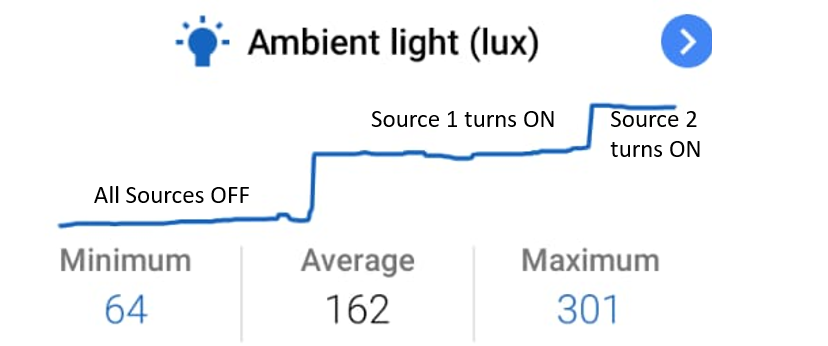
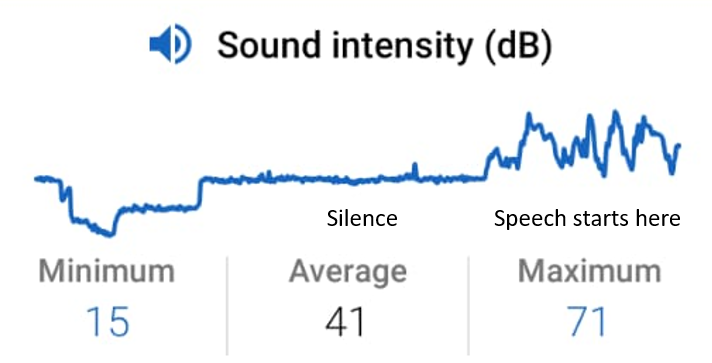
Initially I switched off all the sources of light in the room and then switched them on, one-by-one and light sensor data did actually record an increase in the ambient light intensity. Similarly, for testing the sound sensor, initially I simulated pin drop silence in the room and then turned on the speech on my laptop. As expected, the sound levels increased with the speech.
Pitch & Magnetometer
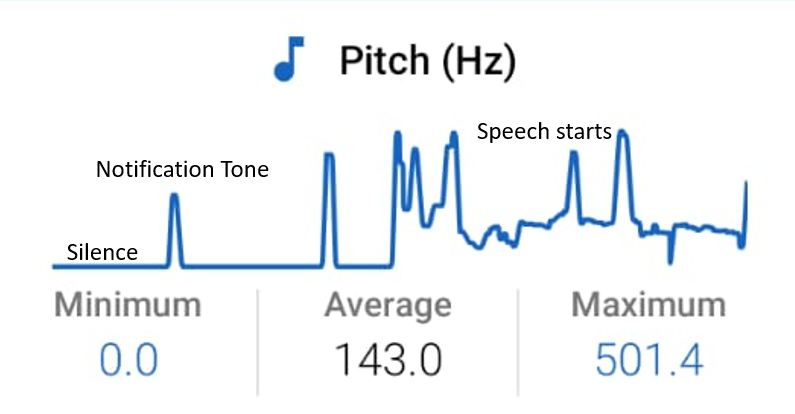
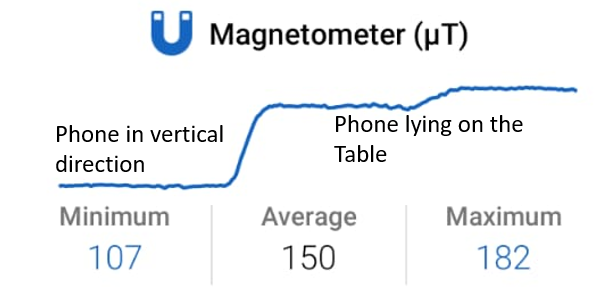
In Silence the pitch is Zero, for a notification tone, we observe a spike in the pitch and when the speech starts, then we can clearly see the signal in the speech. Similarly, for the magnetometer, when the phone is in vertical direction the value of magnetic field is smaller and as we change the direction of the phone, the magnetic field increases.
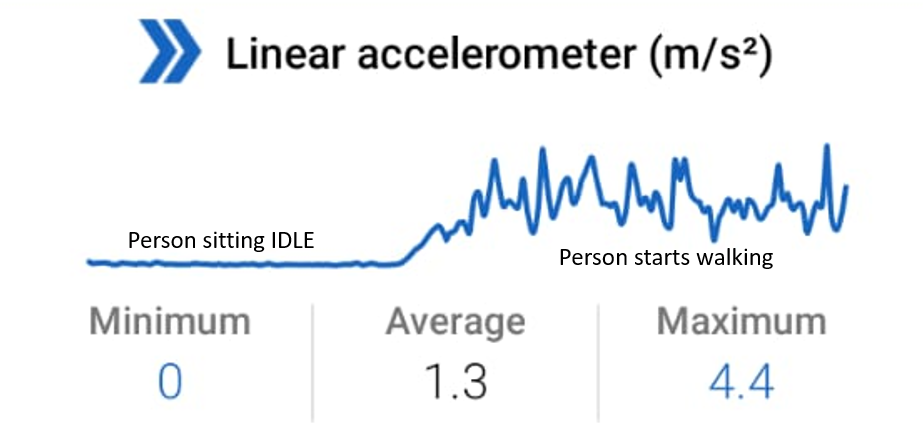
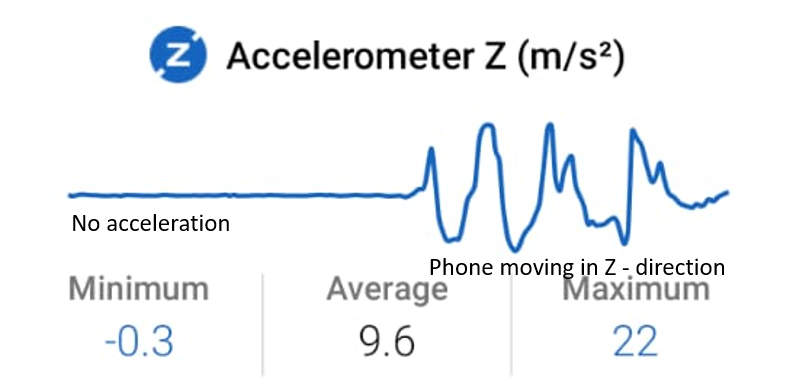
Linear and Z - acceleration
When the phone is stable and not moving, then it shows zero linear acceleration and constant acceleration in z-direction(9.8m/s*s). However, as soon as we start shaking the phone, we observe changes in the linear and z-acceleration.
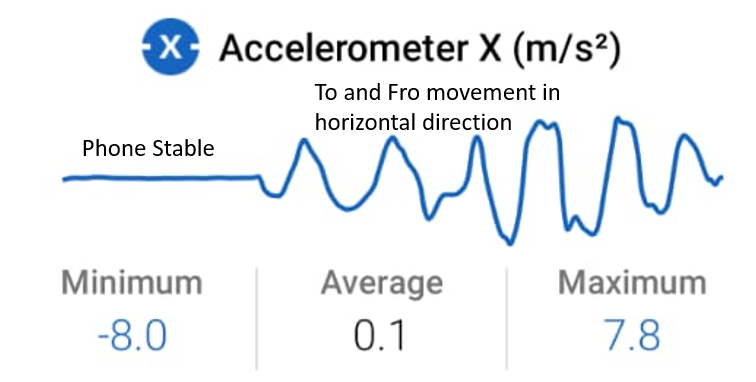
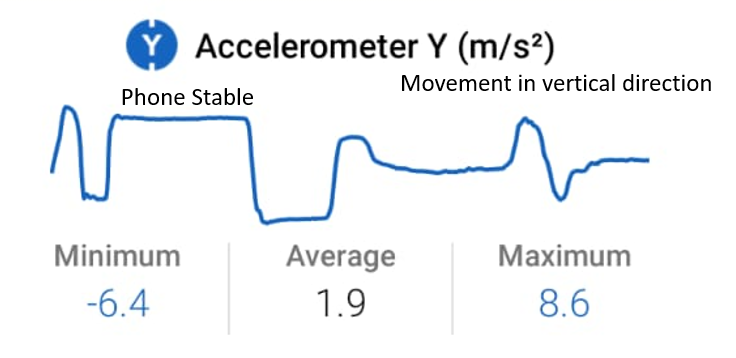
X and Y acceleration
No movement shows constant acceleration in X,Y direction(which is essentially zero), when we start to & fro movement, we essentially observe a sine wave like pattern.
Part B
Objective: Automatically Opening Dustbin
We created the mechanism for an automatic dustbin. Whenever the person comes in front of the dustbin, the dustbin is able to automatically open on its own. For the purpose of this assignment we have set the maximum distance for which the dustbin opens to be 25cm.
Components Required
- Arduino Uno
- SR04 ultrasonic sensor
- Servo Motor
- Jumper wires(for connection)
- Dustbin
Connections and Coding the Board
Using the Arduino, we interface the ultrasonic sensor and servo motor. We use ‘SR04.h’ and ‘Servo.h‘ libraries for controlling the ultrasonic sensor and servo motor respectively. Connect the power supply of +5V and GND across the SR04 and servo. Now connect ‘Trigger pin to Pin 12’ and ‘Echo pin to Pin 11’ of SR04 and ‘control pin to pin 9’ of the servo motor and upload the code available here to the arduino.
Now place the ultrasonic sensor and servo motor at the images shown in the picture

Now, as we place the leg in front of the dustbin(in the vicinity of 25 cms), we will see that the dustbin opens. The demonstration of the same is given in the following video.(due to unavailability of dustbin, the demonstration is shown using rotation of servo motor only)
Problems Faced
If someone is passing by the dustbin, we have to detect that and do not open the dustbin in that case. So if the person is standing in front of the dustbin(aka ultrasonic sensor) for more than 1 seconds, then only the dustbin will open
Error values in Inputs of Ultrasonic sensor: At some time points the error values(abnormally large distance values although the object was right in front) were coming in the output of the ultrasonic sensor, to avoid that, we considered the 3 time points before and 3 time points after the current values and if 5 (out of 7) suggest that any object was present in front of ultrasonic sensor, we open the dustbin.