Assignment 3
Buttons on GUI when pressed show corresponding LED colors
A GUI allows the user of a computer to communicate with the computer by moving a pointer around on a screen and clicking a button. The computer will do different things depending upon where the pointer is on the screen and how a button is pressed. A program on the computer is constantly checking for the location of the pointer on the screen, any movement of the mouse, and any buttons pressed.
The Code
Documenting the process
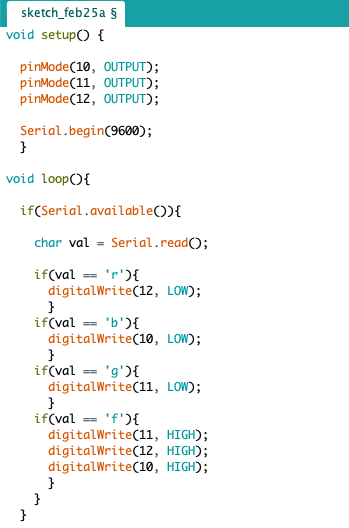
1. While writing the code for arduino we start with labelling the output pin. In this case 3 output pins were needed
2. And now the loop code was written according to our requirements as to what command should reciprocate what.
3. In this case i have used 4 values 3 for different colors and another one for "all off".
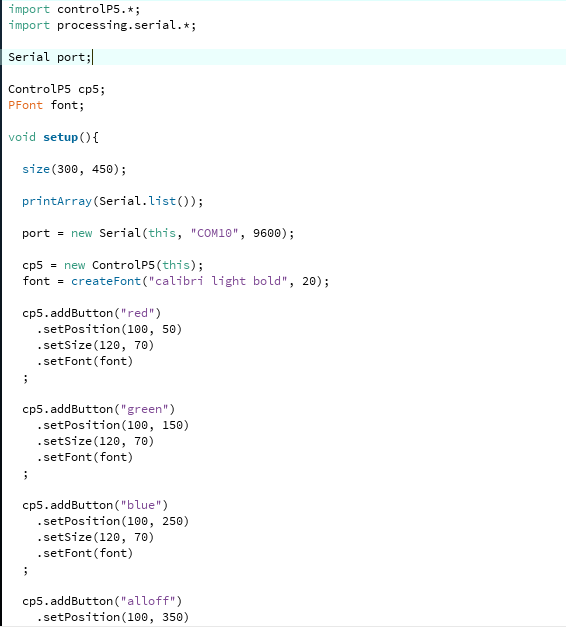
4. For the code of processing we first start with including the library
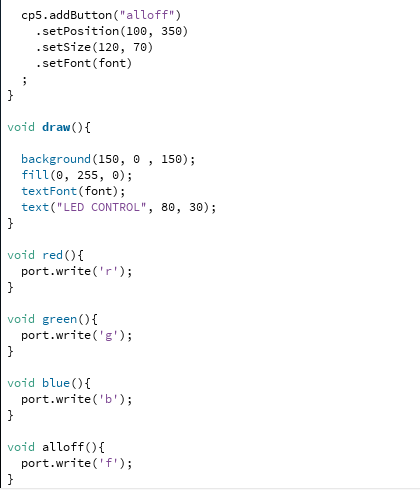
5. We specify the font size, the dimensions of our buttons, the dimensions of the window,background color,etc.
6. Now while writing the functions to the button for this we specify what to print when a certain button is pressed which will then be picked up by the arduino code